
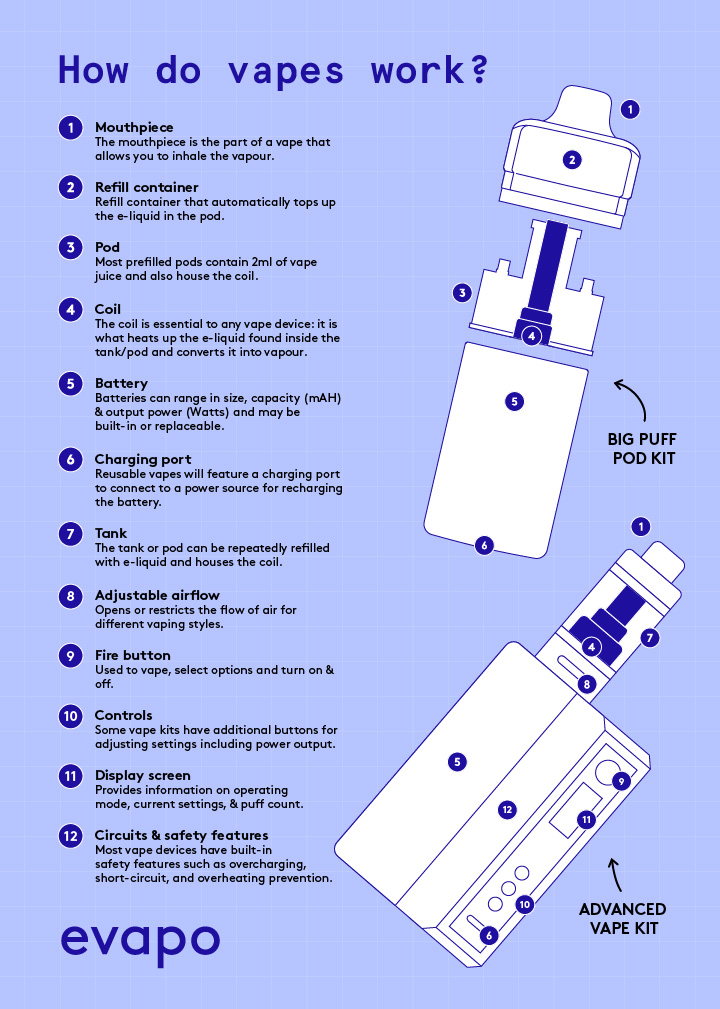
The world of vaping can be complex, with various settings and customizations available on modern devices. Sometimes, these adjustments can lead to unexpected issues or simply become outdated. This is where the concept of “zeroing” your vape comes in. Essentially, it’s like hitting the reset button on your device, returning it to its factory default state.
This article will delve into the intricacies of zeroing your vape, explaining what it entails, its benefits, and how to perform this process effectively. We’ll also explore how zeroing can be a valuable tool for troubleshooting common vaping problems. By the end, you’ll have a comprehensive understanding of how to utilize this technique to optimize your vaping experience.
What is Zeroing a Vape?
What does zeroing a vape mean? In simple terms, it refers to resetting your vaping device back to its original factory settings. This means erasing any personalized configurations, adjustments you’ve made to wattage, temperature control, or other settings, and returning the device to its pristine state as it was when you first purchased it.
Think of it like restoring your smartphone to factory defaults – all your apps, settings, and data are wiped clean, leaving a fresh slate. Similarly, zeroing your vape effectively clears any stored information and configurations, allowing for a new start.
What is zeroing a vape? It’s a process that can be initiated through various methods depending on the specific model of your device. Some vapes may have a dedicated button combination to initiate the reset, while others might require accessing a hidden menu within their settings.
Benefits of Zeroing Your Vape
Zeroing your vape offers several advantages, making it a valuable tool for both troubleshooting and maintaining optimal performance:
- Troubleshooting Issues: If you’re experiencing persistent problems with your vape, such as erratic power output, inconsistent heating, or strange display errors, zeroing can often resolve these issues. By resetting the device to its factory settings, you eliminate any potential software glitches or corrupted configurations that might be causing the problem.
- Optimal Performance: Over time, accumulated customizations and adjustments can sometimes lead to suboptimal performance. Zeroing your vape allows it to operate at its peak efficiency by reverting to the manufacturer’s intended settings.
- Preparing for Sale or Gifting: When selling or gifting your vape, zeroing it ensures that the new owner receives a device in its original state, free from any personal configurations or data. This provides a clean slate and allows the recipient to customize the device according to their preferences.
How to Zero a Vape Device
The exact process for zeroing a vape can vary depending on the specific model and manufacturer. However, there are some general steps that apply to most devices:
- Consult Your User Manual: The first step is always to refer to your vape’s user manual. It will provide detailed instructions on how to zero the device safely and effectively.
- Identify the Reset Button or Combination: Most vapes have a dedicated button or a specific combination of buttons that initiates the reset process. Look for markings on your device or in the user manual indicating the reset function.
- Hold Down the Buttons: Once you’ve located the reset buttons, hold them down simultaneously for the specified duration indicated in the manual. This usually involves pressing and holding for several seconds.
- Confirm the Reset: After releasing the buttons, your vape may display a confirmation message or prompt indicating that the reset process is complete.
Troubleshooting with Zeroing

Zeroing can be an effective troubleshooting technique for various vaping issues:
- Inconsistent Heating: If your vape isn’t heating consistently, zeroing it can resolve software glitches or corrupted settings that might be affecting the temperature control.
- Erratic Power Output: If you experience fluctuations in power output, leading to inconsistent vapor production, zeroing can help stabilize the device’s performance.
- Display Errors: Strange display errors or unresponsive buttons can often be resolved by resetting the device to its factory settings.
Conclusion
Zeroing your vape is a valuable tool for maintaining optimal performance, troubleshooting issues, and preparing your device for sale or gifting. By understanding what it entails and how to perform it correctly, you can ensure that your vaping experience remains smooth and enjoyable. Remember to always consult your user manual for specific instructions related to your vape model.

